Rattling / Dirty Bass, Touch / Display Issues, and More - Physical Damage
Symptoms: HomePod may or may not be working fine. You may hear rattling when you shake it, or have touch / display issues, even making it appear that the HomePod isn't powering on or only briefly powers on and bootloops.
Diagnosis: For rattling / dirty sounding bass, check that your subwoofer is not bent and properly sealed. Pull your logic board out and check for broken loose plastic. You can try to glue or plastic weld the broken parts back together, or replace the top basket entirely. Thoroughly inspect logic cable, display cable, and connectors for any damage.
Repair: Not recommended to ignore this otherwise the logic board can shift enough to push the display cable into the frame and cut into it, causing weird power / display / touch issues.
Root Cause: Usually this is from some of the frame holding the logic board breaking off as a result of drop damage. Ensure you pack your Pod properly whenever shipping it!
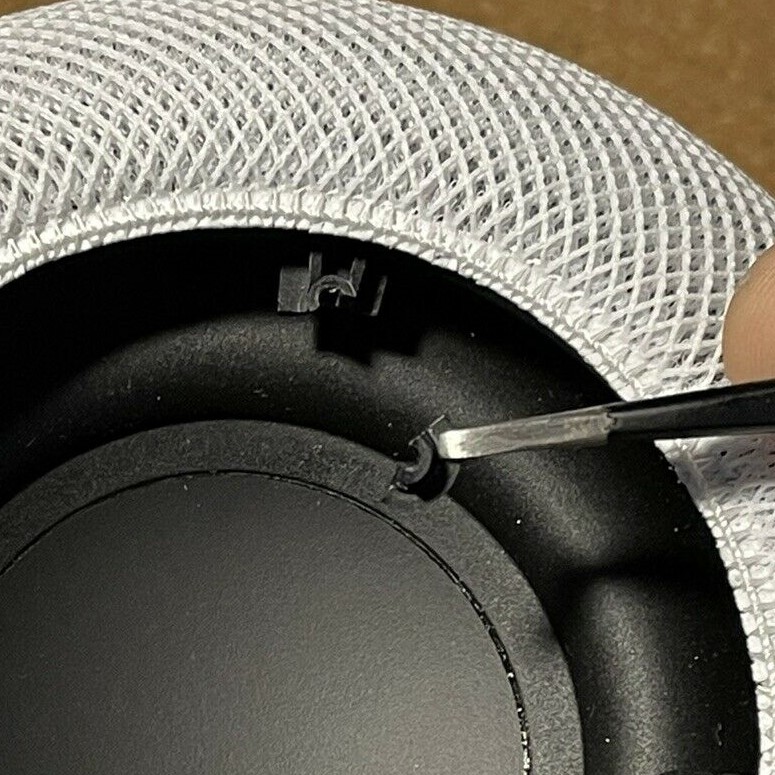
Broken Plastic From logic Board Frame
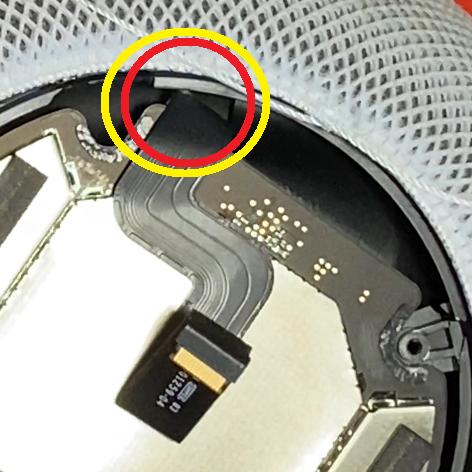
Display Cable Cut From Board Shift